 SaleHero

BaseLinker
Every marketplace and shop you sell on, through one connection.
BaseLinker is where most Romanian sellers collect orders from their shop and marketplaces. SaleHero reads orders, catalog and stock from it, shows them as one de-duplicated list, and writes stock, prices and status changes back.
The problem it removes
- “I open ten tabs to answer one customer about one order.”
- “The system says 120, the shelf says 112, and the BaseLinker number is a third one.”
- “I change a price in one place and forget the other channels.”
What comes into SaleHero
- Orders from every channel BaseLinker is connected to, with invoice number and AWB
- The catalog (names, categories, media) and what each channel lists
- Stock per BaseLinker warehouse
- Returned and refused parcels from the order journal
What SaleHero sends out
- Absolute stock quantities per SKU and warehouse
- Prices into the BaseLinker price groups you choose
- Order status changes, kept in a queue and retried if BaseLinker is unavailable
- Corrected delivery addresses (when you switch that on)
- B2B orders, goods receptions as purchase orders and customer returns
What you need
- A BaseLinker account and its API token
- The inventory you want SaleHero to work with
- A SaleHero user who can change Settings
How to connect it
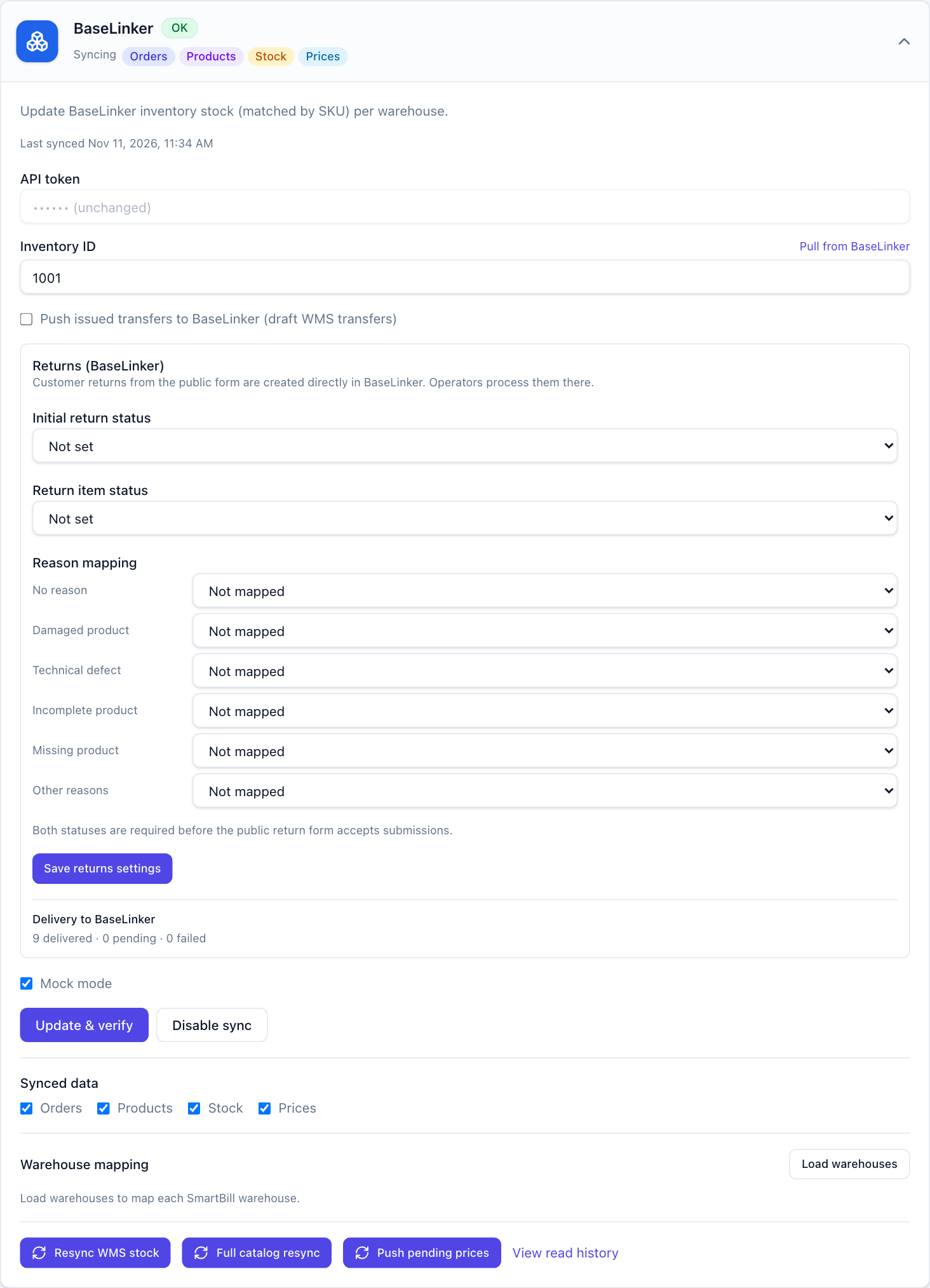
- 1Open Settings, then Integrations, and open the BaseLinker card.
- 2Paste the API token. Next to Inventory ID, press Pull from BaseLinker and pick your inventory.
- 3Choose the BaseLinker price groups that should receive your full price and your sale price.
- 4Press Connect and verify, then choose the data to sync.
- 5Map each BaseLinker warehouse to a SaleHero warehouse and save the mappings.
What it powers
The features that depend on this connection.
Orders
Every order from your store and your marketplaces in one list, with the invoice, the AWB, the stock and the history on the same page. Problems are flagged before the customer writes.
See detailsStock you can trust
SaleHero puts your accounting stock and your warehouse stock side by side, SKU by SKU, and shows you where they disagree and why. You fix the cause, not the symptom.
See detailsReal profit
SaleHero puts the full cost on every product, in every channel and country: purchase, customs, VAT, transport, commission. You see the margin that is left, not the one you hoped for.
See detailsPricing
One table with every price, its cost and its margin. Rules you set once, a suggestion engine that respects them, and a break-even for each marketplace.
See detailsReturns
A return form for your customers, one case per return for your team, and the refused parcels that come back tracked in the same place. Each step has its own status, so you see what failed.
See detailsWarehouse floor
Scan each parcel as it goes to the courier. SaleHero matches the scan to the order, shows what has not left yet, and gives the floor a phone app, a wall board and counts that target the bins most likely to be wrong.
See detailsCatalog and specifications
One product list built from BaseLinker, SmartBill and Shopify, matched by SKU. Specifications are kept in SaleHero, checked for completeness and pushed to the places that need them.
See detailsB2B portal
A portal where each wholesale client sees their own prices and stock, orders alone and downloads the invoice. For your own team, an approval step, prepaid credit, feeds and offers.
See details
Learn it step by step
The guide pages that walk through this.
Questions we get
- Do I still need BaseLinker?
- Yes. BaseLinker keeps talking to your shops and marketplaces. SaleHero sits next to it and reads and corrects what it holds.
- How often does it sync?
- By default warehouse stock is read every 5 minutes and orders every hour. Both can be paused in Settings.
- Which marketplaces arrive through BaseLinker?
- Whatever your BaseLinker account is connected to. eMAG orders, for example, reach SaleHero this way.
Connect your tools and see the first numbers
Most connections take a few minutes. The first data lands the same day.