 SaleHero
Wholesale clients order by phone and Excel.
A portal where each wholesale client sees their own prices and stock, orders alone and downloads the invoice. For your own team, an approval step, prepaid credit, feeds and offers.
Pendant lamp P-118
132.00 lei
In stock: 200+Ceiling light LED-4021
118.50 lei
In stock: 100+Wall light W-07
96.00 lei
In stock: 37 pcsGU10 spot set
24.90 lei
Out of stockIncoming: 300 pcs · expected ~12 Dec
Above 100, the exact quantity is never shown, so a reseller's shop does not reveal your depth.
Sounds familiar?
- Every wholesale price list is an Excel file that is out of date by Friday.
- Orders arrive as phone calls and screenshots, and someone retypes them.
- A client asks what is in stock, and the answer is a guess from yesterday.
- Prepaid balances live in a notebook, and nobody can say what a client has left.
What changes for the team
- Wholesale clients place orders themselves, at their own price, at any hour.
- Nobody retypes an order from a phone call or a screenshot.
- Prepaid balances have a ledger you can open with the client.
- Price lists stay current because they are built from live data.
How it works
B2B portal
- 01
Clients sign up, you approve and set their prices
A client signs up on your public page or follows an invitation you sent by e-mail. The invitation works for 14 days and can carry a price group, so the client is approved from the start. Until you approve a client and give them a B2B price group, they see no catalog. You can suspend and re-approve a client later.
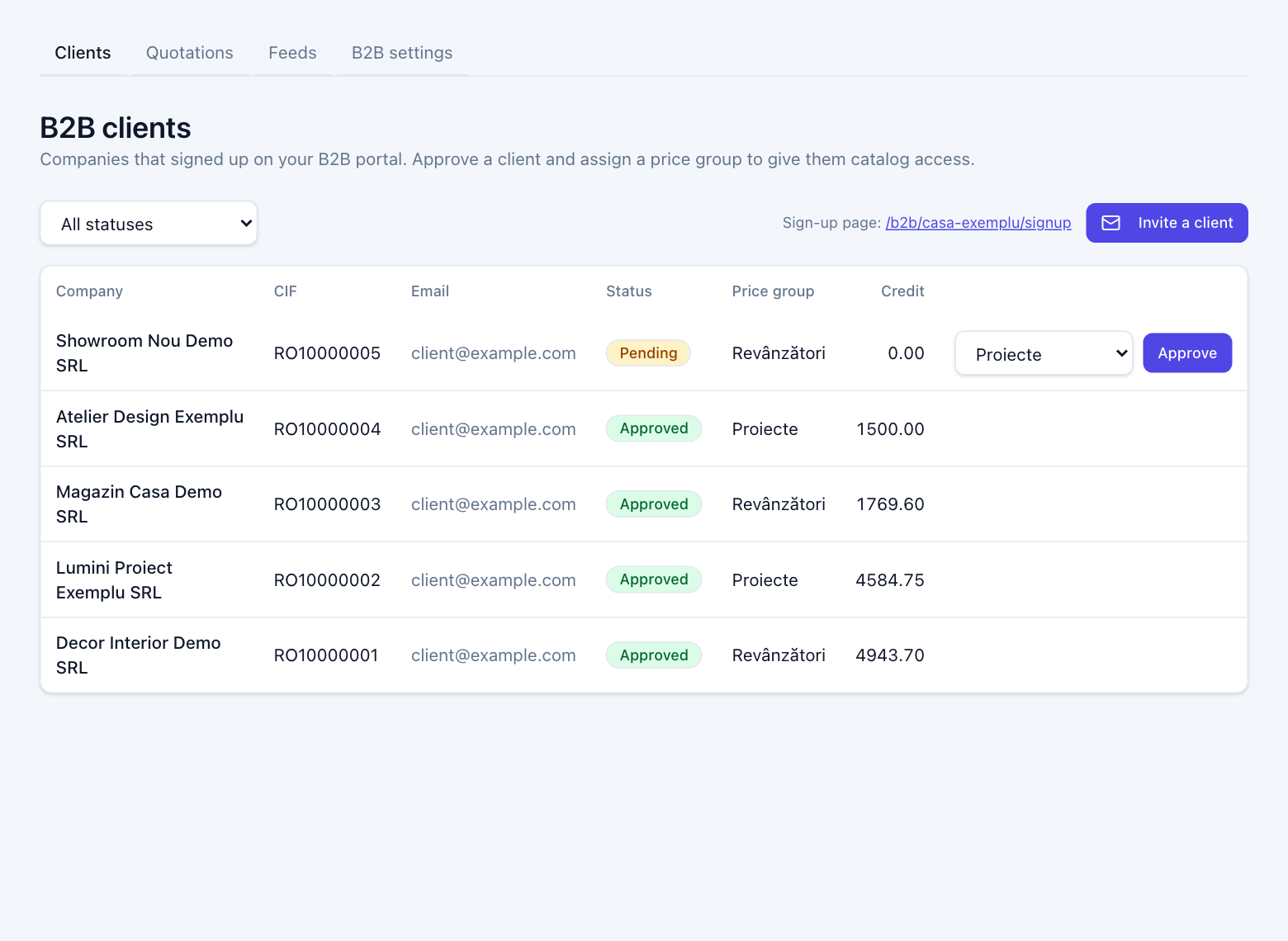
Approve a client and pick their price group in the same row. - 02
A catalog that shows each client their own prices
The portal carries your logo. The client sees a product grid with their own prices, a cart and a checkout, and an order list with statuses and the invoice as a PDF. Stock is shown in bands: 200 or more, 100 or more, the exact number below 100, and out of stock. Incoming stock can be shown with a date. You choose which products are visible to B2B clients, product by product.
- 03
Orders, payment and shipping the way wholesale works
At checkout the client chooses delivery, dropship or pickup, and pays by bank transfer, from prepaid credit, cash on delivery or at pickup. If you enable it for a client, they can order on payment terms. Delivery adds a transport fee that depends on their price group. Orders get a B number and can be forwarded to BaseLinker automatically when placed, with the order source and statuses you pick. B2B orders can reserve stock, and checkout stops when a line is short.
- 04
Prepaid credit with a ledger
A client can hold a prepaid balance. You record a payment received with its bank reference, and it can be booked only once. Orders paid from credit spend it, a cancelled order gives it back automatically, and every movement is a line in the client's ledger. A SmartBill reversal can be credited to the client as a suggestion for you to confirm, never automatically. Note that this is a prepaid balance, not a credit limit.
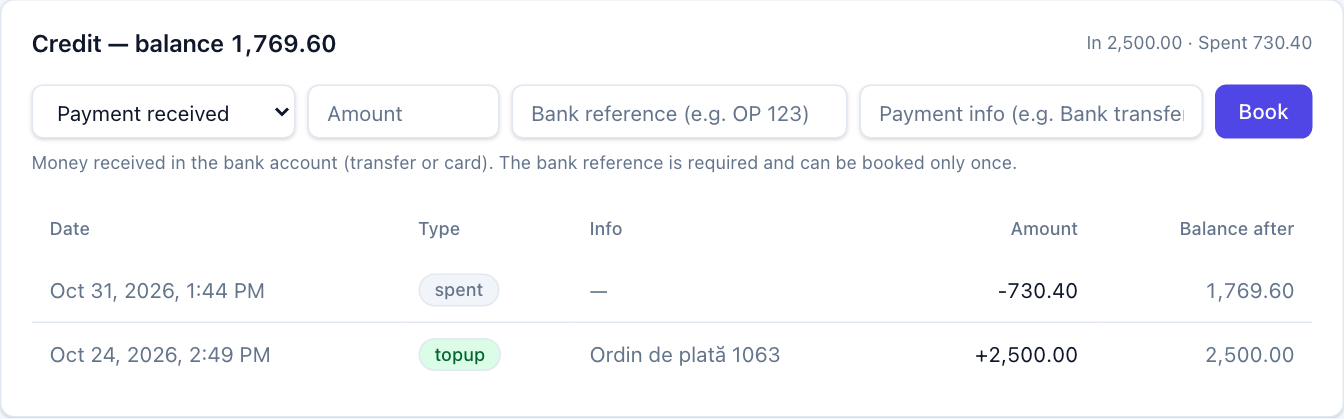
Every top-up, order and refund, with the balance after each one. - 05
Feeds, quotations and an API for the client's own systems
Clients who run their own shop can pull your catalog. You build custom feeds in CSV, XML or JSON with the columns you choose, including one column per product specification, and give them to selected price groups. Feeds are built when downloaded, so prices and stock are current. Sync plugins can use a private pull link that you can revoke. For offers, you generate a quotation as PDF or Excel for a price group, with filters, optional stock and images and a valid-until date. Clients can also create an API token in the portal to place and read orders from their own system.
- Built-in feeds for a standard catalog CSV, Shopify and WooCommerce.
- Pull links are limited to 60 pulls an hour each.
- The order API has no idempotency key yet; the PDF reference says so.
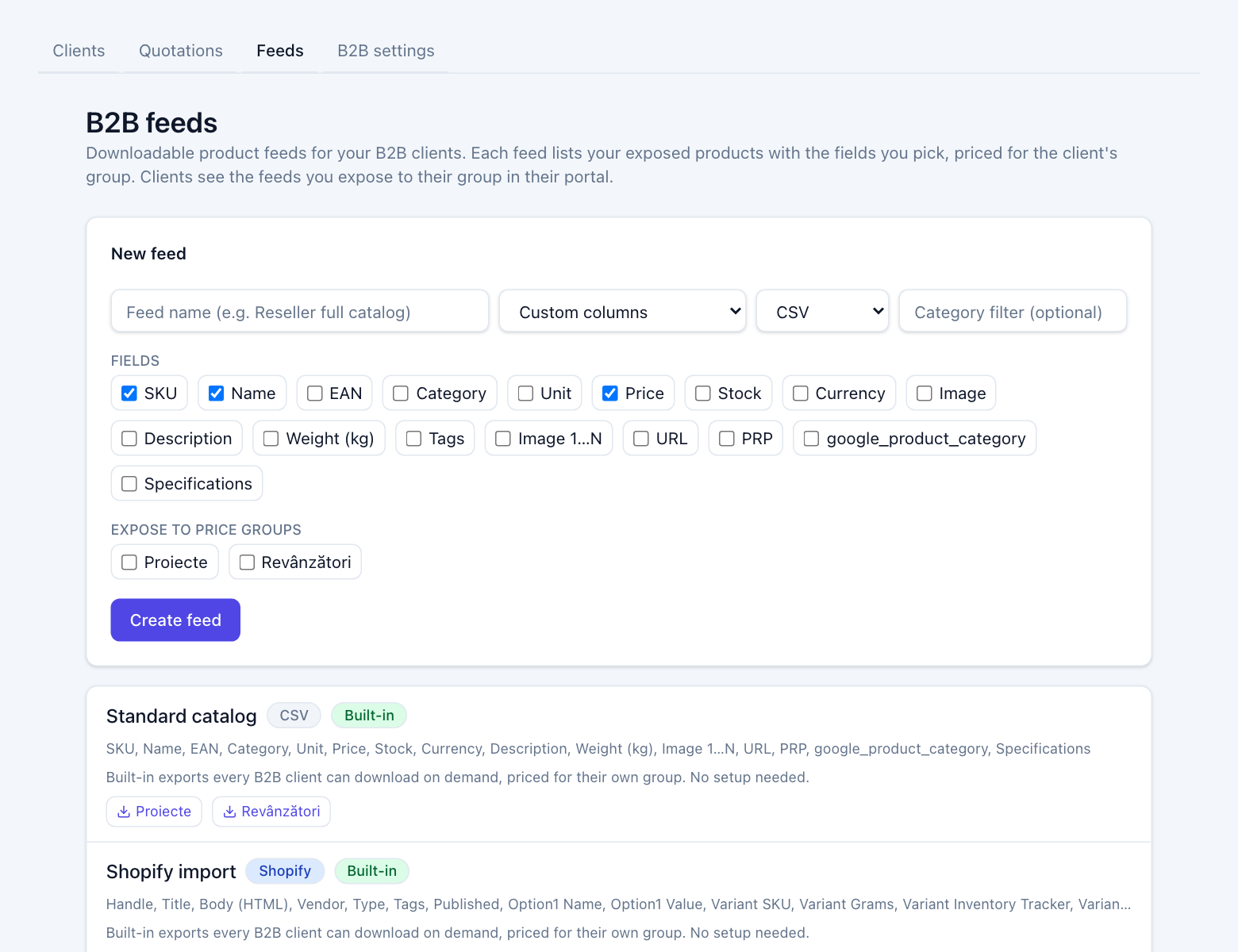
Build a feed with the columns you choose, for the price groups you choose.
Works with the tools you already use
SaleHero reads from and writes to these. You keep your accounts.


Questions we get
Is there a credit limit?
No. B2B credit is a prepaid balance that you top up and the client spends. You can allow payment on terms for a client, and those orders arrive in BaseLinker marked as terms.
How are EU clients taxed?
If a client's billing country is another EU country than Romania, the portal shows prices without VAT, and the order is forwarded and invoiced at 0% VAT with the intra-community mention. This follows the billing country only. SaleHero does not check the client's VAT number.
Do orders reach BaseLinker?
Yes, if you allow it. You can forward each order by hand or automatically when it is placed, and choose the statuses and the order source.
Can a client see my retail prices?
No. A client sees only the price group you assign, and B2B groups are never sent to public channels.
Is there an API for catalog access?
Catalog access is through feeds and pull links. The client API covers placing an order, listing orders, reading one order and its status events, with 120 requests a minute per token.
See it on your own numbers
Connect your tools and the first data lands the same day.