 SaleHero
The same product spec is retyped in every channel.
One product list built from BaseLinker, SmartBill and Shopify, matched by SKU. Specifications are kept in SaleHero, checked for completeness and pushed to the places that need them.
Attributes · Ceiling lights
- Powernumber · Wrequired
- Socketlist · E27, GU10, E14required
- Dimmableyes / no
- IP ratinglist
LED-4021 ceiling light
- Power12 Wfrom the title
- SocketGU10BaseLinker
- DimmableYestyped by hand
Store filters
Power
- 0–10 W
- 10–20 W
- 20–40 W
Socket
- E27
- GU10
- E14
Sounds familiar?
- The wattage, the socket and the IP class are typed in the store, again in BaseLinker, and again in a spreadsheet for a marketplace.
- The same SKU has a different name, EAN or price in each system, and nobody knows which one is right.
- Half the products in a category have no specifications, and you only notice when the filters on the store look empty.
- Creating a few hundred products means a spreadsheet, a hope and a clean-up afterwards.
What changes for the team
- A specification is typed once and reaches every place that needs it.
- Conflicts between systems are a list you work through.
- You know which categories are complete before you push to the store.
- A bulk change is previewed, not trusted.
How it works
Catalog and specifications
- 01
One product list from the systems you already use
SaleHero reads products from BaseLinker, SmartBill and Shopify and matches them by SKU into one list. What you maintain in SaleHero, such as statuses, specifications and B2B prices, is kept when the sources sync again. The list searches by SKU, name or barcode and filters by source, category, price, stock and status. It exports to Excel with the columns you choose and prints product labels with the EAN and a QR code.
- Stock by warehouse, demand, returns and cases on every product page.
- Eight status chips, from active to delisted, so the team talks about the same state.
- Understocked and overstocked tabs and an ABC analysis.
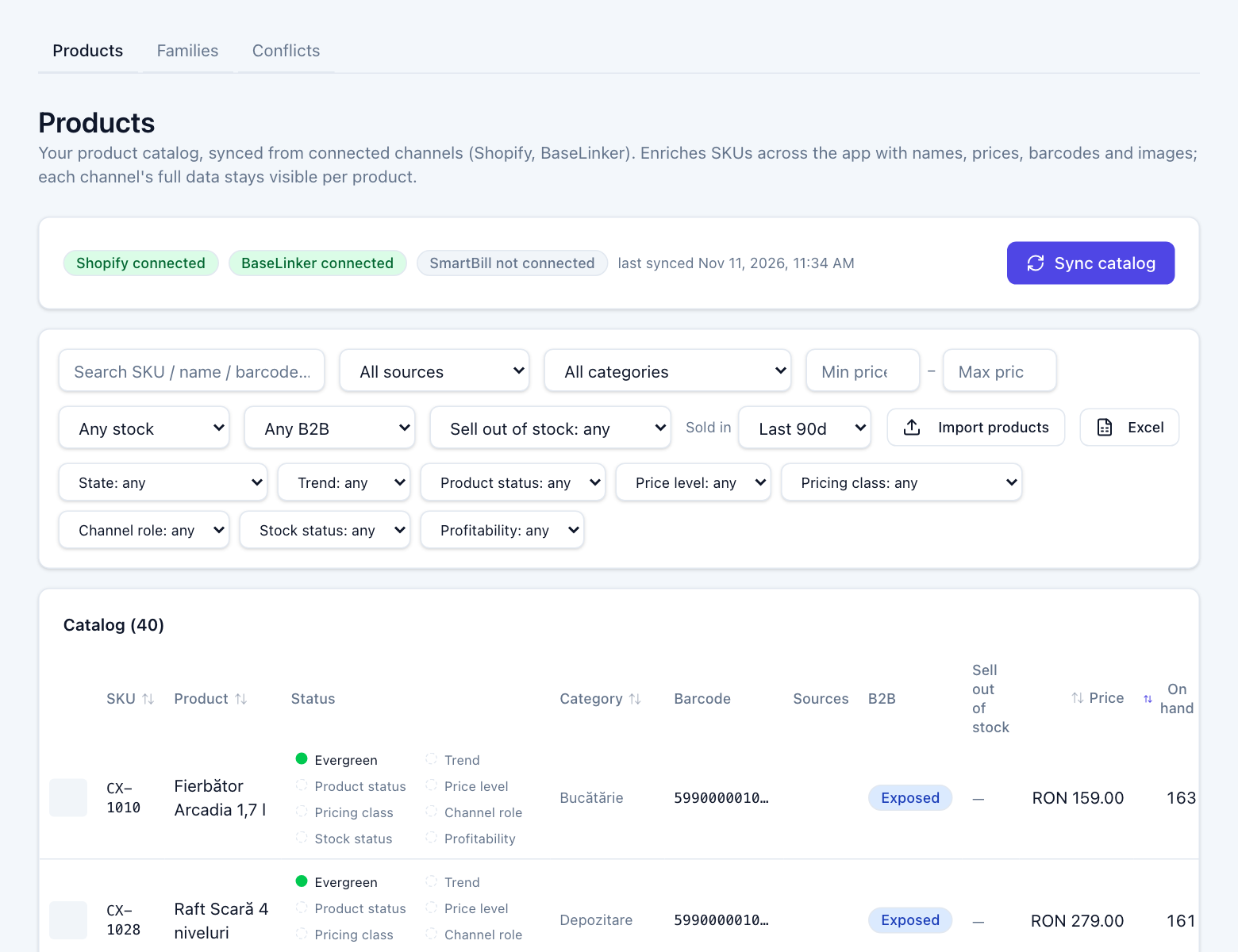
One list, with the state of each source on top. - 02
See where your sources disagree
The conflicts page lists the SKUs where the sources differ: a different EAN, a duplicate EAN, a different price, a different name, or a product that one system knows and another does not. Price comparison is VAT-aware, so a net against gross difference is not flagged. Names and EANs can be settled in SaleHero, where the value is saved on the product while the sources keep their own. You can also import a file of SKUs and EANs, with a preview, to fill the gaps.
- 03
Specifications defined once, by category
In the specifications area you define the attributes, as text, number, yes or no, single choice or multiple choice, with a unit and a list of options. You decide which attributes each category requires. SaleHero can propose a schema from the data you already have, and it measures completeness for every category that has one. When the same attribute has values from several places, a value typed by hand wins over an import, an import over Shopify and Shopify over BaseLinker, and a weaker source never overwrites a stronger one.
- Export a workbook, fill it in offline and import it back. A sheet never overwrites a value typed by hand.
- Specification families apply a set of values to many products at once.
- Tools to merge, convert or move attributes run as a dry run first.
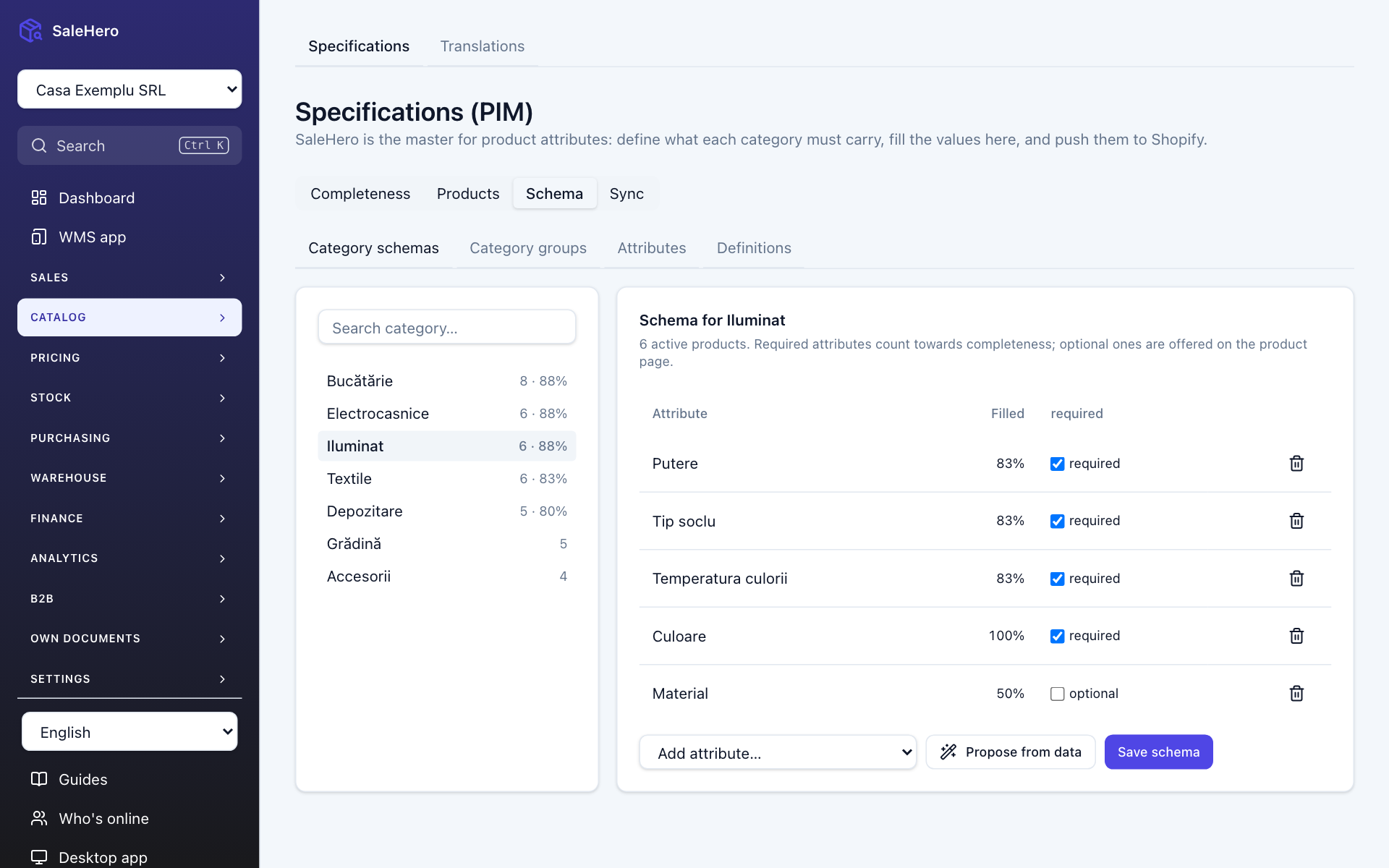
Each category says which attributes it requires. - 04
Push specifications to Shopify, and fill them from what you have
SaleHero can read the metafield definitions of your Shopify store into attributes, pull the values already there and push the values you changed back to Shopify product metafields. For filters, it can also derive ranges, so a power value lands in a bucket the store can filter on. Features that BaseLinker already holds are ingested as values. Specifications can also be read out of product titles, such as the wattage or the socket, and fill only what is still empty. Shopify is changed by a push, so preview before you press it.
- 05
Import products from a spreadsheet, and see what will change first
An import takes XLSX or UTF-8 CSV files up to 10 MB and 20,000 rows. You map the columns, choose whether to create, update or both, and review a preview of what will change before anything is written. Dynamic price groups cannot be imported, because they are calculated.
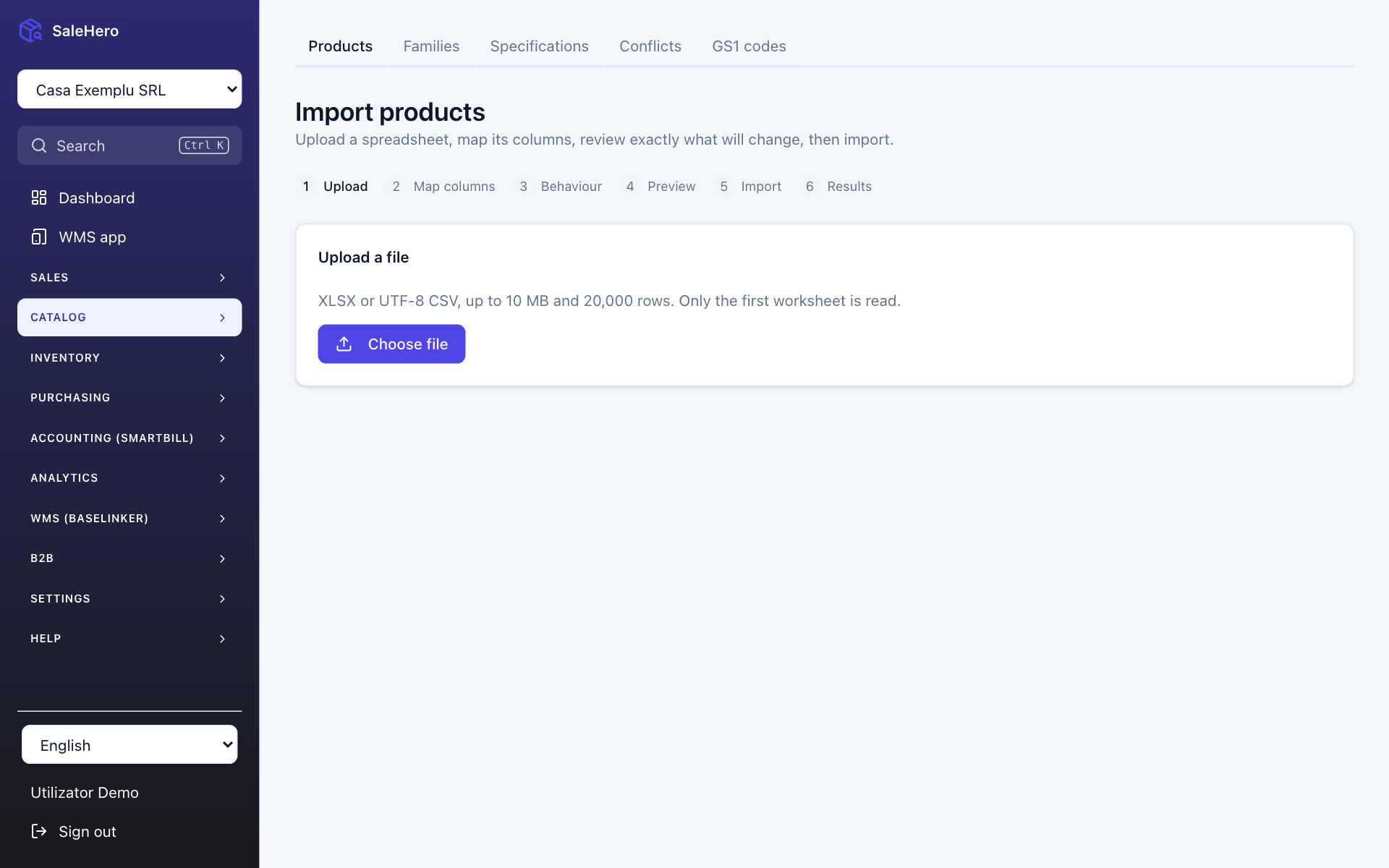
Six steps, with a preview of every change before the import.
Works with the tools you already use
SaleHero reads from and writes to these. You keep your accounts.


Learn it step by step
The guide pages that walk through this.
Questions we get
Does SaleHero create products in BaseLinker or Shopify?
The catalog is built by reading those systems. Specifications you keep in SaleHero are pushed to Shopify as metafields, and BaseLinker features are read in. Creating a product in your store or in BaseLinker stays where it is today.
What happens to my specifications when a source syncs?
Values you typed are never overwritten by a weaker source. The order is: typed by hand, import, Shopify, BaseLinker.
Is there a draft and a live state for products?
No. Products have a status such as active, evergreen, preorder or delisted, and that status is yours to maintain.
What is the GS1 page?
A read-only view of your GS1 Romania codes, matched to your products' barcodes, so you can see which codes are in use. It works through the GS1 member portal rather than an official API, so a portal redesign can interrupt it, and it does not request or edit codes.
See it on your own numbers
Connect your tools and the first data lands the same day.