 SaleHero
One price change means six panels, and I still sell under cost.
One table with every price, its cost and its margin. Rules you set once, a suggestion engine that respects them, and a break-even for each marketplace.
This week's suggestions
Pendant lamp P-118
A bestseller almost gone, still on promotion
Stock cover: 9 days
Sold: 62 in 30 days
RestoreCampaign 149.99List 179.99Next container in 41 days: stop discounting it.
Ceiling light LED-4021
Running out, nothing on order
Stock cover: 12 days
Sold: 40 in 30 days
Raise219.99229.99+5%, so the last units earn more.
Wall light W-07
Sells, but slowly
Stock cover: 190 days
Sold: 6 in 30 days
Reduce189.99169.99−10%, margin still 32%.
Floor lamp F-22
Nothing sold in 90 days
Stock cover: no sales
Sold: 0 in 90 days
Clear399.99Clearance 279.99Never under cost + 10%.
GU10 spot set, on eMAG
Priced under the margin floor
Stock cover: 70 days
Sold: 18 in 30 days
Hold39.99Under your 25% floor: flagged, never lowered further.
You choose the trade-off
Margin first
Floor 35% · healthy cover 60–120 days
Fewer discounts; slow stock waits longer for its price.
Balanceddefault
Floor 25% · healthy cover 60–90 days
Where the engine starts.
Volume first
Floor 15% · healthy cover 30–60 days
Stock turns faster and cash comes back sooner.
Margin floors and the healthy stock cover are your settings; the engine works inside them.
Sounds familiar?
- A supplier raises a cost, and nobody knows which products are now below cost until the monthly report.
- The marketplace price is set by hand in its own panel and drifts away from your store price.
- Slow products sit at full price for months while fast ones sell out at a price you could have raised.
- Every price is typed by hand and the endings are all over the place: .99, .50, .00.
What changes for the team
- Below-cost products are on a filtered list, not in a month-end surprise.
- Price endings and margin floors follow the policy instead of whoever typed the price.
- Slow stock is reduced and fast stock is raised on evidence you can read.
- Marketplace prices are checked against a break-even before anyone lists.
How it works
Pricing
- 01
Every price next to its cost
The price panel is one table with every product: stock, profit, the full price, the purchase price, the cost of goods and one column per price group. Filter to the products with no price or no cost, or by margin band from below cost to ultra, and set the full price for a whole selection in one step, after a count tells you how many products it touches. Each product keeps its price history, and the table exports to Excel.
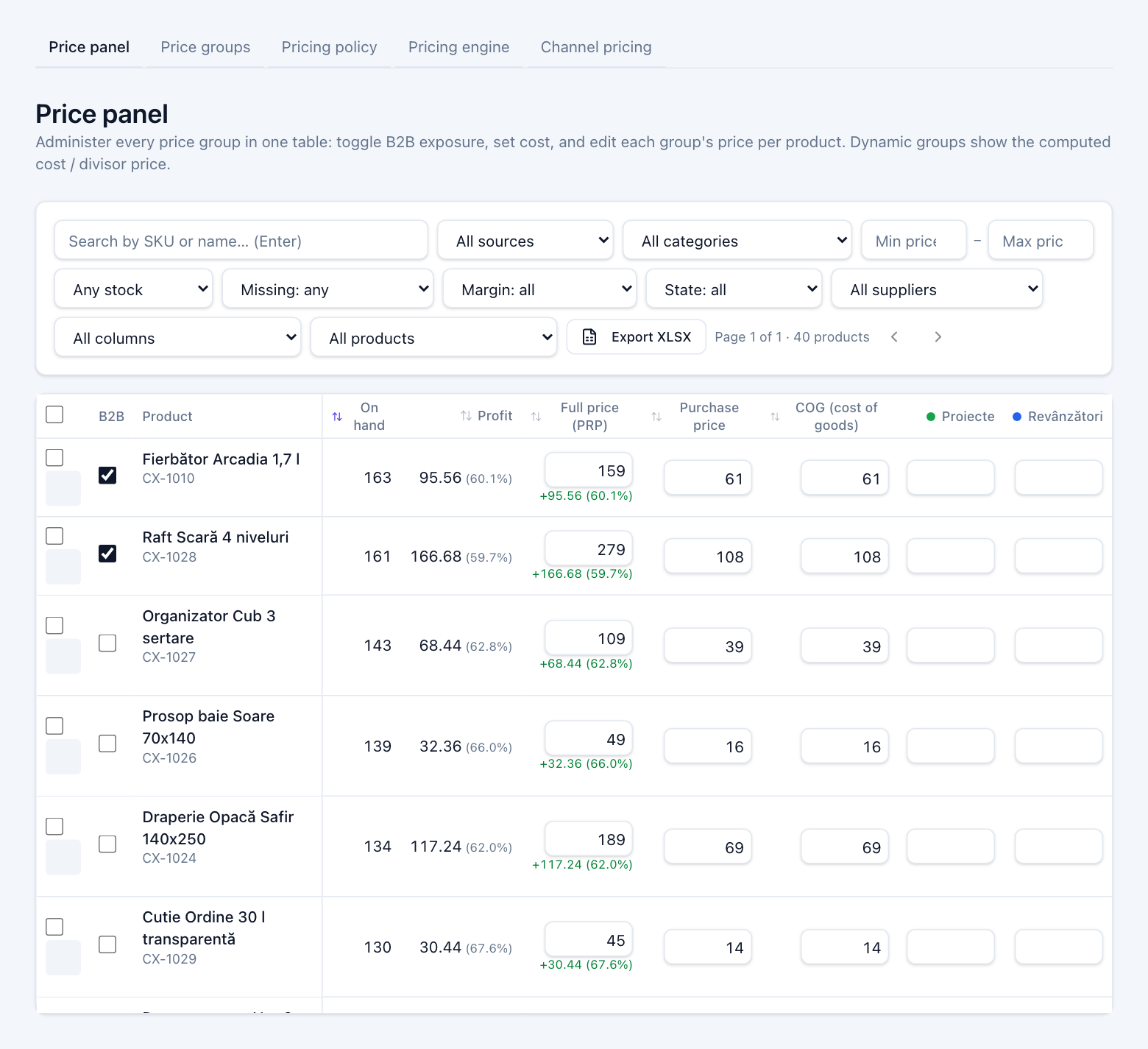
Every price group in one table, next to the cost. - 02
Price groups, with B2B kept out of public channels
A price group is either static, with a price you type, or dynamic, calculated from the purchase price with a divisor. Groups sync to BaseLinker price groups, and the panel flags a group that is not synced. Standard groups can go to your sales channels. B2B groups are never sent to public channels.
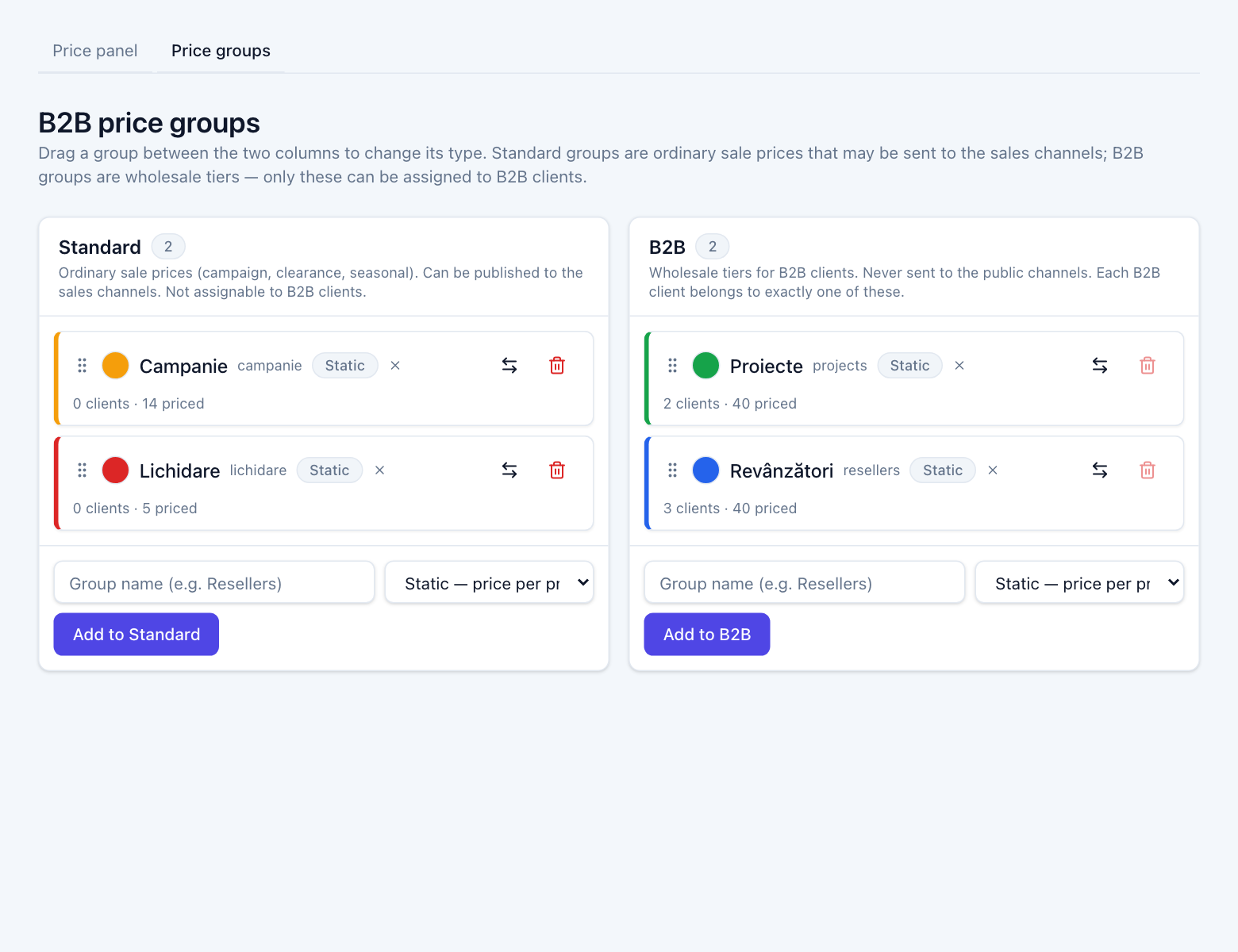
Standard groups can go to your channels; B2B groups stay with B2B clients. - 03
Your rules, written down once
The pricing policy holds the rules the team already follows in its head: whether margin is counted on cost or on price, the B2B discount, a minimum margin for each pricing class and tier, and the price endings you want at each level with a target share, such as .99, .79 or .97. A violations table lists every product that breaks a rule. Saving the policy changes no price by itself.
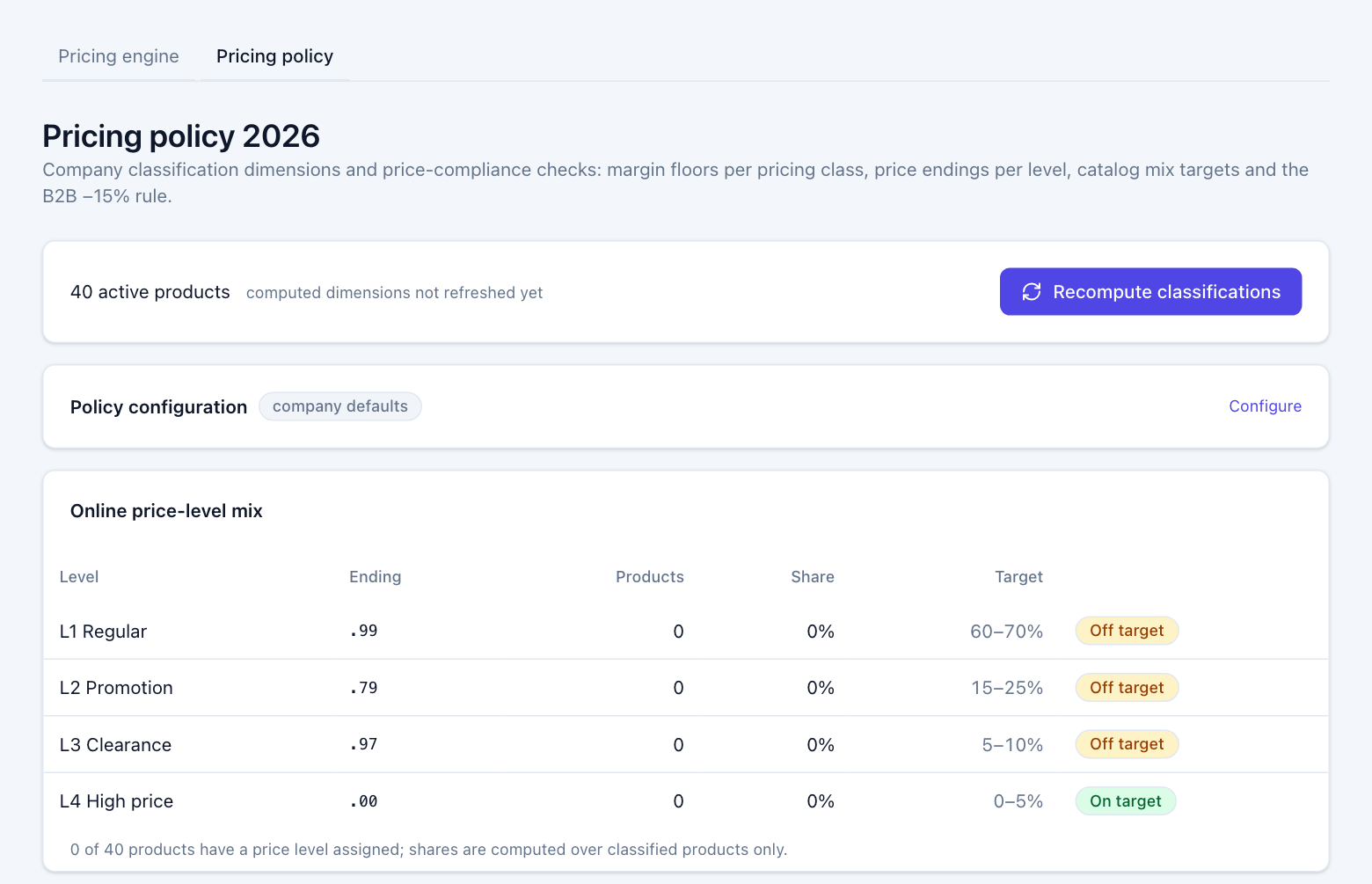
The price endings you want at each level, with a target share. - 04
A suggestion for every product, with the reason
The pricing engine compares stock cover with sales speed and your margins. A product with a lot of cover and slow sales gets Reduce or Clear. A product that is selling fast on thin stock gets Raise. Each row says why, shows the demand and stock behind it, and respects the guards you set: never below the margin floor, incoming stock counts as stock, and a price that changed recently gets time to settle before the next move. Cost is measured landed cost when you have it, then the buy price, then the purchase price. You apply a suggestion or a whole price ladder yourself; nothing changes until you do.
- You set the healthy cover range, the sales window and the fallback margin floor.
- The Lichidare step is never below cost plus 10%.
- Each price is marked on the ladder as under the floor, not a discount, or fine.
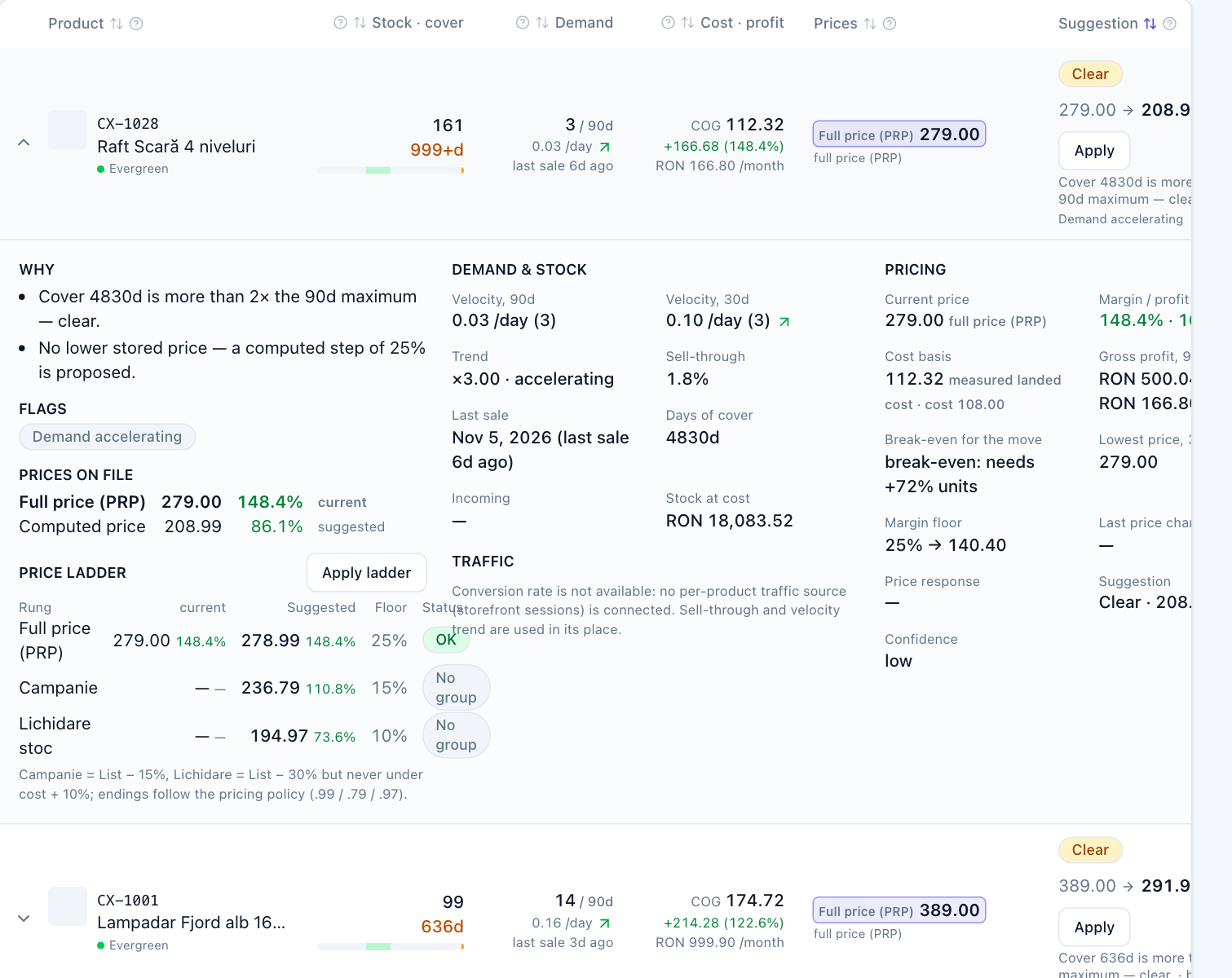
One product opened up: why the engine suggests a price, and the ladder with its floors. - 05
Approve the important ones from Slack
If you connect your own Slack app, the engine can post its high-confidence suggestions to a channel, one message each, with Approve, Reject and Details. Only a SaleHero admin whose e-mail matches the Slack user can approve. If the price changed in the meantime, the approval is refused, and a suggestion that nobody answers expires after three days.
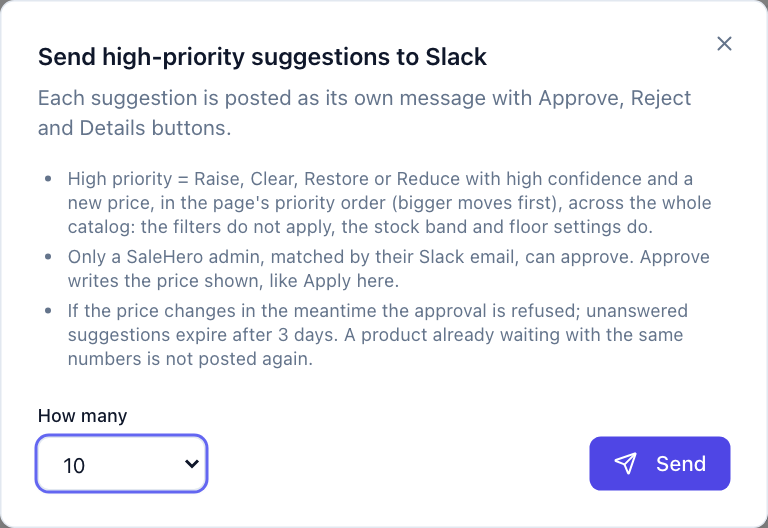
Send the high-priority suggestions to Slack for a one-click decision. - 06
Know the break-even before you list on a marketplace
A channel model describes one marketplace, for example Trendyol Romania: its currency and country, the cost basis you use, its fees as a percent of price, a percent of cost or a fixed amount per unit, and a risk factor. SaleHero works out the break-even price for each product and marks it Below break-even, Below minimum, Not listed, No cost or OK. You can override single SKUs from an Excel file with a preview, and import the marketplace's own product export to compare it with what you have today.
- This is a review and export tool: SaleHero does not change prices on the marketplace.
- Start from a blank model and enter your own fees.
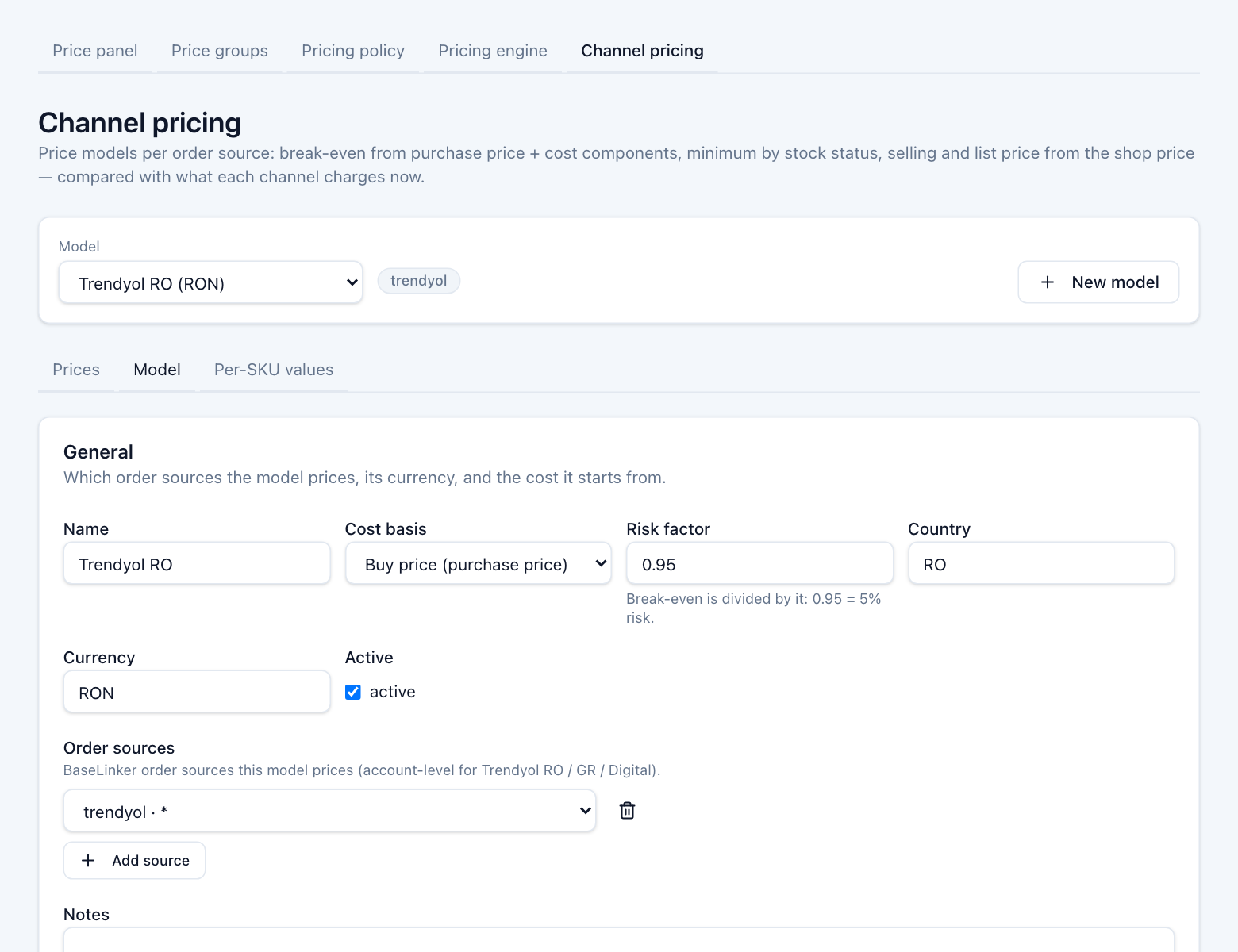
One model per marketplace, from the purchase price to the break-even.
Works with the tools you already use
SaleHero reads from and writes to these. You keep your accounts.


Questions we get
Does the engine change prices on its own?
No. It suggests, with a reason. You apply a price or a ladder, or approve it from Slack. A nightly check also reports products priced below cost.
Does it push prices to my marketplaces?
Not today. Channel pricing models calculate break-even and compare with the marketplace's export so you can decide, and they export a file. Prices sync to BaseLinker through price groups.
What counts as cost?
The engine uses measured landed cost when it exists, then the buy price, then the purchase price. The panel shows which one a figure is.
Is a price ever below my margin floor?
The engine never suggests one. A price you type yourself can be, and the policy's violations table lists it.
See it on your own numbers
Connect your tools and the first data lands the same day.